Linux - An Open Source OS

High functional, goal-oriented, and result driven Analyst with 2+ years of progressive experience. contributing to organizational success through high-level strategy and the implementation of excellence. Strong track record of inspiring effective cross-functional collaboration and innovative problem solving skills.
Passionate about exploring the ever-evolving world of DevOps technology. On a journey to unlock the secrets of seamless development, continuous integration, and deployment.
Committed to continuous improvement and lifelong learning.
🐧Introduction
Are you new to the journey of embracing the LINUX? Then you are at the right place.
Of course, you might have come up with questions like What is Linux? what is kernal? Why Linux for DevOps? This Blog will brief you about all these questions. Let's dive in!
Fun Fact: Linux is distributed under GNU general public license which makes it mandatory for developers and sellers to make the source code public.
✍️Understanding Linux and Its Architect
It's important to understand the Linux architecture to know how Linux as an OS works.
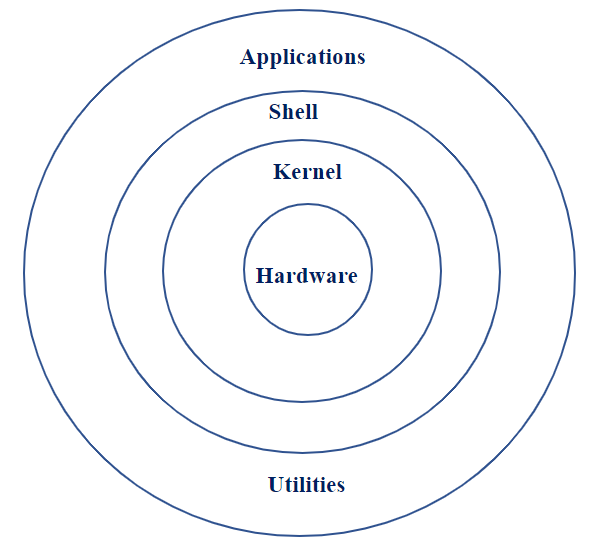
Linux architecture consists of major of four major components as shown above.
Kernel: The kernel is regarded as the operating system's heart. It is critical to understand that the kernel acts as a bridge or a way to communicate between the hardware and the software operating on a Linux-based system. Kernal guarantees that the various software components can connect with the hardware efficiently and securely.
Conclusion: KERNEL is certainly not an Operating system, but a crucial part, the heart of the OS.Shell: The interface between the user and kernel. We can interact with the shell with the help of a terminal(a command line interface), a terminal is a wrapper program that runs a shell and allows us to enter commands.
Even though there is only one Kernel running on the system, there could be several shells in action- one for each user who's logged in.Hardware Layer: Consists of all physical devices like RAM, HDD, CPU, keyboard, etc.
System Utility: It provides the functionalities of an operating system to the user.
For eg: When you enter a command through the keyboard, the Shell thoroughly examines the keyboard input for a special character. It rebuilt the simplified command line and communicated with the kernel to see that the command was executed and necessary action as been taken to fulfill the needs of the user.
💫Linux Commands: The Magical Wand
Linux commands are text-based written instructions that you can write to perform various tasks.
Additionally, we can specify some options, usually referred to as flags or switches, which are extra arguments that change a command's behavior to carry out particular actions or provide more specific information. The command can be coupled with these options, which often begin with a hyphen (-) or two hyphens (--), to customize its functions or output for the user.
For instance, you can list the names of the files available in the directory with the "ls" command, and can be used with the "-a" option to reveal files that are hidden. The complete command would look like this: ls -a
a few fundamental Linux commands that can be used to interact and navigate the Linux operating system (Image source: LinkedIn)

ls: Lists files and directories in the current directory.
cd: Changes the current directory.
- Example: cd/home/practice
pwd: want to know your present working directory. pwd -> Prints the current working directory.

mkdir: Creates a new directory.
- Example:
mkdir new_directory(creates a directory named "new_directory" in the current directory)
- Example:
rm: Removes files and directories.
Example:
rm file.txt(removes the file named "file.txt")Example:
rm -r directory(removes the directory named "directory" and its contents). It can also be read as remove recursively.
mv: Moves or renames files and directories.
Example:
mv file.txt new_location/(moves "file.txt" to the "new_location" directory)Example:
mv file.txt newname.txt(renames "file.txt" to "newname.txt" in the same directory)
cat: Displays the contents of a file.
- Example:
cat file.txt(displays the content of "file.txt" in the terminal)
- Example:
touch: Creates an empty file or updates the timestamp of an existing file.
Example:
touch file.txt(creates a new empty file named "file.txt")Example:
touch -a file.txt(updates the access timestamp of "file.txt")
sudo: Executes a command with administrative/root privileges.
- Example:
sudo apt update(updates the system packages using administrative privileges)
- Example:

👨✈️Linux MANual
Whenever in doubt do the MAN command. The Linux man page or the MAN command is considered as the documented system that contains all the details of different types of commands, The use of a command, its options, and arguments are all described in great detail in the manual pages, which also include examples.
To access the manual, type the man with the command for which you are looking for the details:

As you can see from the below image manual also provides all the potential options or the flags that can be used with the ls commands to obtain the desired results

🔑Conclusion
The kernel is the central element that controls hardware resources and offers crucial functions to the operating system and programs that run on it. Linux is the operating system that encompasses the full software stack.
A majority, almost 91% of the servers and cloud infrastructure run on Linux-based operating systems. Many DevOps tools, including as monitoring solutions and CI/CD pipelines, are designed and run on Linux. Familiarity with Linux is required for installing, setting, and maintaining these tools, as well as sustaining the DevOps methodology.


